> ## Documentation Index
> Fetch the complete documentation index at: https://docs.creatify.ai/llms.txt
> Use this file to discover all available pages before exploring further.
# Overview (v2)
> Generate vivid, personalized videos featuring multiple scenes — each with its own avatar, voice, background, and styling — using a structured list of inputs.
## 🚀 Introduction
We recommend trying our **AI Avatar V2 API** — a powerful and flexible way to generate rich, multi-scene videos tailored to your brand, message, or audience.
With this API, you can define a list of video segments and customize each with:
* 🎭 Character (avatar) selection
* 🗣️ Text-to-voiceover (with your chosen voice and accent)
* 🖼️ Background image or video
* 🎯 Call-to-action (CTA) options
* ✍️ Caption position, style, and formatting
This gives you full control to create immersive, story-driven content that matches your creative needs.
> 🚀 Follow our **Quickstart Guide** below to get up and running in minutes.
 ***
## ⚙️ Quickstart Guide
### ✅ Prerequisites
Before you begin, ensure you have:
* A [Creatify](https://app.creatify.ai) account with **API access**
* Your **API credentials** (see [Quickstart](/quickstart))
***
## 👤 Step 1: Choose Avatars and Voices
You’ll need an `avatar_id` and a `voice_id` for each speaking segment.
* Use the [Get Avatars API](/api-reference/personas/get-apipersonas) to retrieve `avatar_id`
* Use the [Get Voices API](/api-reference/voices/get-apivoices) to retrieve `voice_id`
Each avatar + voice combination represents one unique speaker.
### 👨🎤 Personas
[Browse Personas Here](/api-reference/personas/get-apipersonas/)
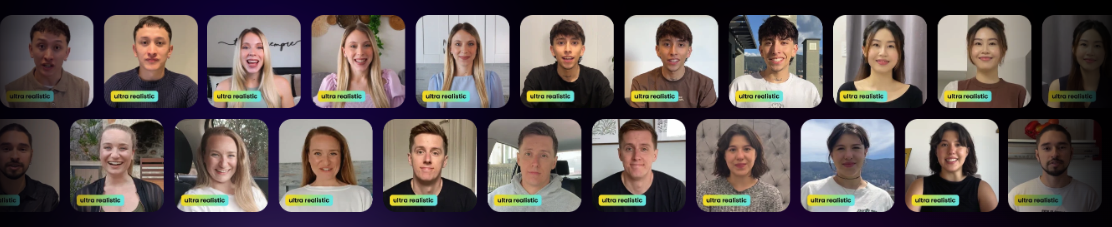
We offer 1500+ lifelike personas to bring your videos to life:
***
### 🎙️ Voices
[Browse Voices Here](/api-reference/voices/get-apivoices)
Creatify offers a wide range of AI voices that bring your avatars to life with natural, expressive speech. Each voice supports multiple accents so you can tailor the sound to your audience or region.
To select a voice, use the `voice_id` from the accent you want in your request. This provides fine-grained control over tone, language, and personality.
* Use `voice_id` to override the default voice associated with an avatar.
* If `voice_id` is not provided, the system will use the default voice linked to the selected avatar.
> 💡 Each voice includes multiple accents — select the one that fits your content best using the provided `id`.
### Example Response from `GET /api/voices/`
```json theme={null}
[
{
"name": "Fatima",
"gender": "female",
"accents": [
{
"id": "3480f048-8883-4bdc-b57f-4e7078e94b18",
"accent_name": "American English accent",
"preview_url": "https://d35ghwdno3nak3.cloudfront.net/accent_preview_new_/el-689d6bc2-c93e-4a50-a36b-3b171c729843_s.mp3"
}
]
}
]
```
Use the `id` from the `accents` list as your `voice_id` in the video generation request.
***
## 📅 Step 2: Submit a Video Generation Request
Use the [AI Avatar v2 Endpoint](/api-reference/lipsyncs_v2/post-apilipsyncs) to submit a video generation request.
```bash Example Request [expandable] theme={null}
curl --request POST \
--url https://api.creatify.ai/api/lipsyncs_v2/ \
--header 'Content-Type: application/json' \
--header 'X-API-ID: your-api-id' \
--header 'X-API-KEY: your-api-key' \
--data '{
"video_inputs": [
{
"character": {
"type": "avatar",
"avatar_id": "7350375b-9a98-51b8-934d-14d46a645dc2",
"avatar_style": "normal",
"offset": {
"x": -0.23,
"y": 0.35
}
},
"voice": {
"type": "text",
"input_text": "Absolutely mind-blowing! The Apple Vision Pro turns any room into a cinematic experience with its Spatial Audio and Immersive Video.",
"voice_id": "6f8ca7a8-87b9-4f5d-905d-cc4598e79717"
},
"background": {
"type": "image",
"url": "https://video.creatify.ai/bg.jpg"
},
"caption_setting": {
"style": "normal-black",
"offset": {
"x": 0,
"y": 0.45
}
}
},
{
"character": {
"type": "avatar",
"avatar_id": "18fccce8-86e7-5f31-abc8-18915cb872be",
"avatar_style": "normal",
"offset": {
"x": -0.23,
"y": 0.35
}
},
"voice": {
"type": "text",
"input_text": "Truly, a next-level entertainment device. Get yours now and experience the magic firsthand!",
"voice_id": "360ab221-d951-413b-ba1a-7037dc67da16"
},
"background": {
"type": "image",
"url": "https://video.creatify.ai/bg.jpg"
},
"caption_setting": {
"style": "normal-black",
"offset": {
"x": 0,
"y": 0.45
}
}
}
],
"aspect_ratio": "9x16",
"model_version": "aurora_v1_fast"
}'
```
```json Example Response [expandable] theme={null}
{
"id": "0a15fff5-8906-4de0-bbf2-511bd3b5db23",
"name": null,
"output": null,
"video_thumbnail": null,
"created_at": "2025-05-21T11:38:05.558338-07:00",
"updated_at": "2025-05-21T11:38:05.700088-07:00",
"credits_used": 0,
"progress": 0,
"failed_reason": null,
"media_job": "9f5e31fe-bf60-4e82-b6aa-36f8683a2157",
"status": "pending",
"webhook_url": null,
"preview": null,
"aspect_ratio": "9x16",
"video_inputs": [
{
"character": {
"type": "avatar",
"avatar_id": "7350375b-9a98-51b8-934d-14d46a645dc2",
"scale": 1.0,
"avatar_style": "normal",
"offset": {
"x": -0.23,
"y": 0.35
},
"hidden": false
},
"voice": {
"type": "text",
"input_text": "Absolutely mind-blowing! The Apple Vision Pro turns any room into a cinematic experience with its Spatial Audio and Immersive Video.",
"voice_id": "6f8ca7a8-87b9-4f5d-905d-cc4598e79717",
"volume": 0.8
},
"caption_setting": {
"style": "normal-black",
"offset": {
"x": 0.0,
"y": 0.45
},
"font_family": "Montserrat",
"font_size": 70,
"font_style": null,
"background_color": null,
"text_color": null,
"highlight_text_color": null,
"max_width": null,
"line_height": null,
"text_shadow": null,
"hidden": false
},
"background": {
"type": "image",
"url": "https://d35ghwdno3nak3.cloudfront.net/images/71648ae7.jpg",
"fit": "crop",
"effect": null
},
"transition_effect": {
"transition_in": null,
"transition_out": null
},
"visual_style": null
},
{
"character": {
"type": "avatar",
"avatar_id": "18fccce8-86e7-5f31-abc8-18915cb872be",
"scale": 1.0,
"avatar_style": "normal",
"offset": {
"x": -0.23,
"y": 0.35
},
"hidden": false
},
"voice": {
"type": "text",
"input_text": "Truly, a next-level entertainment device. Get yours now and experience the magic firsthand!",
"voice_id": "360ab221-d951-413b-ba1a-7037dc67da16",
"volume": 0.8
},
"caption_setting": {
"style": "normal-black",
"offset": {
"x": 0.0,
"y": 0.45
},
"font_family": "Montserrat",
"font_size": 70,
"font_style": null,
"background_color": null,
"text_color": null,
"highlight_text_color": null,
"max_width": null,
"line_height": null,
"text_shadow": null,
"hidden": false
},
"background": {
"type": "image",
"url": "https://d35ghwdno3nak3.cloudfront.net/images/71648ae7.jpg",
"fit": "crop",
"effect": null
},
"transition_effect": {
"transition_in": null,
"transition_out": null
},
"visual_style": null
}
]
}
```
> ⚠️ Save the `id` — you'll use it to check progress.
***
## ⏳ Step 3: Check Generation Status
After submitting a video generation request, use the returned task ID to monitor progress and retrieve the completed video when it's ready.
```bash Example Request theme={null}
curl --request GET \
--url https://api.creatify.ai/api/lipsyncs_v2/0a15fff5-8906-4de0-bbf2-511bd3b5db23/ \
--header 'X-API-ID: your-api-id' \
--header 'X-API-KEY: your-api-key'
```
```json Example Response [expandable] theme={null}
{
"id": "0a15fff5-8906-4de0-bbf2-511bd3b5db23",
"name": null,
"output": "https://s3.us-west-2.amazonaws.com/remotionlambda-uswest2-30tewi8y5c/renders/qgyaj0flwt/output.mp4",
"video_thumbnail": "https://dpbavq092lwjh.cloudfront.net/amzptv/9f5e31fe-bf60-4e82-b6aa-36f8683a2157-1747852767/thumbnail.jpg",
"created_at": "2025-05-21T11:38:05.558338-07:00",
"updated_at": "2025-05-21T11:39:28.059339-07:00",
"credits_used": 5,
"progress": 1,
"failed_reason": null,
"media_job": "9f5e31fe-bf60-4e82-b6aa-36f8683a2157",
"status": "done",
"webhook_url": null,
"preview": "https://app.creatify.ai/preview?layout=videos/20250521/c45abe03-5aec-47c6-88da-303619e86df8.json",
"aspect_ratio": "9x16",
"video_inputs": [
{
"character": {
"type": "avatar",
"avatar_id": "7350375b-9a98-51b8-934d-14d46a645dc2",
"scale": 1.0,
"avatar_style": "normal",
"offset": {
"x": -0.23,
"y": 0.35
},
"hidden": false
},
"voice": {
"type": "text",
"input_text": "Absolutely mind-blowing! The Apple Vision Pro turns any room into a cinematic experience with its Spatial Audio and Immersive Video.",
"voice_id": "6f8ca7a8-87b9-4f5d-905d-cc4598e79717",
"volume": 0.8
},
"caption_setting": {
"style": "normal-black",
"offset": {
"x": 0.0,
"y": 0.45
},
"font_family": "Montserrat",
"font_size": 70,
"font_style": null,
"background_color": null,
"text_color": null,
"highlight_text_color": null,
"max_width": null,
"line_height": null,
"text_shadow": null,
"hidden": false
},
"background": {
"type": "image",
"url": "https://d35ghwdno3nak3.cloudfront.net/images/71648ae7.jpg",
"fit": "crop",
"effect": null
},
"transition_effect": {
"transition_in": null,
"transition_out": null
},
"visual_style": null
},
{
"character": {
"type": "avatar",
"avatar_id": "18fccce8-86e7-5f31-abc8-18915cb872be",
"scale": 1.0,
"avatar_style": "normal",
"offset": {
"x": -0.23,
"y": 0.35
},
"hidden": false
},
"voice": {
"type": "text",
"input_text": "Truly, a next-level entertainment device. Get yours now and experience the magic firsthand!",
"voice_id": "360ab221-d951-413b-ba1a-7037dc67da16",
"volume": 0.8
},
"caption_setting": {
"style": "normal-black",
"offset": {
"x": 0.0,
"y": 0.45
},
"font_family": "Montserrat",
"font_size": 70,
"font_style": null,
"background_color": null,
"text_color": null,
"highlight_text_color": null,
"max_width": null,
"line_height": null,
"text_shadow": null,
"hidden": false
},
"background": {
"type": "image",
"url": "https://d35ghwdno3nak3.cloudfront.net/images/71648ae7.jpg",
"fit": "crop",
"effect": null
},
"transition_effect": {
"transition_in": null,
"transition_out": null
},
"visual_style": null
}
]
}
```
> ⏳ Once the `status` is `done`, download the video from the `output` field.
***
## 🎯 Summary
| Step | Endpoint |
| ------------- | ------------------------------------------------------------------------------- |
| Get Avatars | `GET /api/personas/` |
| Get Voices | `GET /api/voices/` |
| Create Task | `POST /api/lipsyncs/multi_avatar/` |
| Check Status | `GET /api/lipsyncs/{id}/` |
| API Reference | [Multi-Avatar Reference](/api-reference/lipsyncs/post-apilipsyncs-multi-avatar) |
***
## 🤝 Need Help?
If you run into any issues, check out our [API Reference](/api-reference) or contact [api@creatify.ai](mailto:api@creatify.ai).
***
## ⚙️ Quickstart Guide
### ✅ Prerequisites
Before you begin, ensure you have:
* A [Creatify](https://app.creatify.ai) account with **API access**
* Your **API credentials** (see [Quickstart](/quickstart))
***
## 👤 Step 1: Choose Avatars and Voices
You’ll need an `avatar_id` and a `voice_id` for each speaking segment.
* Use the [Get Avatars API](/api-reference/personas/get-apipersonas) to retrieve `avatar_id`
* Use the [Get Voices API](/api-reference/voices/get-apivoices) to retrieve `voice_id`
Each avatar + voice combination represents one unique speaker.
### 👨🎤 Personas
[Browse Personas Here](/api-reference/personas/get-apipersonas/)
We offer 1500+ lifelike personas to bring your videos to life:
***
### 🎙️ Voices
[Browse Voices Here](/api-reference/voices/get-apivoices)
Creatify offers a wide range of AI voices that bring your avatars to life with natural, expressive speech. Each voice supports multiple accents so you can tailor the sound to your audience or region.
To select a voice, use the `voice_id` from the accent you want in your request. This provides fine-grained control over tone, language, and personality.
* Use `voice_id` to override the default voice associated with an avatar.
* If `voice_id` is not provided, the system will use the default voice linked to the selected avatar.
> 💡 Each voice includes multiple accents — select the one that fits your content best using the provided `id`.
### Example Response from `GET /api/voices/`
```json theme={null}
[
{
"name": "Fatima",
"gender": "female",
"accents": [
{
"id": "3480f048-8883-4bdc-b57f-4e7078e94b18",
"accent_name": "American English accent",
"preview_url": "https://d35ghwdno3nak3.cloudfront.net/accent_preview_new_/el-689d6bc2-c93e-4a50-a36b-3b171c729843_s.mp3"
}
]
}
]
```
Use the `id` from the `accents` list as your `voice_id` in the video generation request.
***
## 📅 Step 2: Submit a Video Generation Request
Use the [AI Avatar v2 Endpoint](/api-reference/lipsyncs_v2/post-apilipsyncs) to submit a video generation request.
```bash Example Request [expandable] theme={null}
curl --request POST \
--url https://api.creatify.ai/api/lipsyncs_v2/ \
--header 'Content-Type: application/json' \
--header 'X-API-ID: your-api-id' \
--header 'X-API-KEY: your-api-key' \
--data '{
"video_inputs": [
{
"character": {
"type": "avatar",
"avatar_id": "7350375b-9a98-51b8-934d-14d46a645dc2",
"avatar_style": "normal",
"offset": {
"x": -0.23,
"y": 0.35
}
},
"voice": {
"type": "text",
"input_text": "Absolutely mind-blowing! The Apple Vision Pro turns any room into a cinematic experience with its Spatial Audio and Immersive Video.",
"voice_id": "6f8ca7a8-87b9-4f5d-905d-cc4598e79717"
},
"background": {
"type": "image",
"url": "https://video.creatify.ai/bg.jpg"
},
"caption_setting": {
"style": "normal-black",
"offset": {
"x": 0,
"y": 0.45
}
}
},
{
"character": {
"type": "avatar",
"avatar_id": "18fccce8-86e7-5f31-abc8-18915cb872be",
"avatar_style": "normal",
"offset": {
"x": -0.23,
"y": 0.35
}
},
"voice": {
"type": "text",
"input_text": "Truly, a next-level entertainment device. Get yours now and experience the magic firsthand!",
"voice_id": "360ab221-d951-413b-ba1a-7037dc67da16"
},
"background": {
"type": "image",
"url": "https://video.creatify.ai/bg.jpg"
},
"caption_setting": {
"style": "normal-black",
"offset": {
"x": 0,
"y": 0.45
}
}
}
],
"aspect_ratio": "9x16",
"model_version": "aurora_v1_fast"
}'
```
```json Example Response [expandable] theme={null}
{
"id": "0a15fff5-8906-4de0-bbf2-511bd3b5db23",
"name": null,
"output": null,
"video_thumbnail": null,
"created_at": "2025-05-21T11:38:05.558338-07:00",
"updated_at": "2025-05-21T11:38:05.700088-07:00",
"credits_used": 0,
"progress": 0,
"failed_reason": null,
"media_job": "9f5e31fe-bf60-4e82-b6aa-36f8683a2157",
"status": "pending",
"webhook_url": null,
"preview": null,
"aspect_ratio": "9x16",
"video_inputs": [
{
"character": {
"type": "avatar",
"avatar_id": "7350375b-9a98-51b8-934d-14d46a645dc2",
"scale": 1.0,
"avatar_style": "normal",
"offset": {
"x": -0.23,
"y": 0.35
},
"hidden": false
},
"voice": {
"type": "text",
"input_text": "Absolutely mind-blowing! The Apple Vision Pro turns any room into a cinematic experience with its Spatial Audio and Immersive Video.",
"voice_id": "6f8ca7a8-87b9-4f5d-905d-cc4598e79717",
"volume": 0.8
},
"caption_setting": {
"style": "normal-black",
"offset": {
"x": 0.0,
"y": 0.45
},
"font_family": "Montserrat",
"font_size": 70,
"font_style": null,
"background_color": null,
"text_color": null,
"highlight_text_color": null,
"max_width": null,
"line_height": null,
"text_shadow": null,
"hidden": false
},
"background": {
"type": "image",
"url": "https://d35ghwdno3nak3.cloudfront.net/images/71648ae7.jpg",
"fit": "crop",
"effect": null
},
"transition_effect": {
"transition_in": null,
"transition_out": null
},
"visual_style": null
},
{
"character": {
"type": "avatar",
"avatar_id": "18fccce8-86e7-5f31-abc8-18915cb872be",
"scale": 1.0,
"avatar_style": "normal",
"offset": {
"x": -0.23,
"y": 0.35
},
"hidden": false
},
"voice": {
"type": "text",
"input_text": "Truly, a next-level entertainment device. Get yours now and experience the magic firsthand!",
"voice_id": "360ab221-d951-413b-ba1a-7037dc67da16",
"volume": 0.8
},
"caption_setting": {
"style": "normal-black",
"offset": {
"x": 0.0,
"y": 0.45
},
"font_family": "Montserrat",
"font_size": 70,
"font_style": null,
"background_color": null,
"text_color": null,
"highlight_text_color": null,
"max_width": null,
"line_height": null,
"text_shadow": null,
"hidden": false
},
"background": {
"type": "image",
"url": "https://d35ghwdno3nak3.cloudfront.net/images/71648ae7.jpg",
"fit": "crop",
"effect": null
},
"transition_effect": {
"transition_in": null,
"transition_out": null
},
"visual_style": null
}
]
}
```
> ⚠️ Save the `id` — you'll use it to check progress.
***
## ⏳ Step 3: Check Generation Status
After submitting a video generation request, use the returned task ID to monitor progress and retrieve the completed video when it's ready.
```bash Example Request theme={null}
curl --request GET \
--url https://api.creatify.ai/api/lipsyncs_v2/0a15fff5-8906-4de0-bbf2-511bd3b5db23/ \
--header 'X-API-ID: your-api-id' \
--header 'X-API-KEY: your-api-key'
```
```json Example Response [expandable] theme={null}
{
"id": "0a15fff5-8906-4de0-bbf2-511bd3b5db23",
"name": null,
"output": "https://s3.us-west-2.amazonaws.com/remotionlambda-uswest2-30tewi8y5c/renders/qgyaj0flwt/output.mp4",
"video_thumbnail": "https://dpbavq092lwjh.cloudfront.net/amzptv/9f5e31fe-bf60-4e82-b6aa-36f8683a2157-1747852767/thumbnail.jpg",
"created_at": "2025-05-21T11:38:05.558338-07:00",
"updated_at": "2025-05-21T11:39:28.059339-07:00",
"credits_used": 5,
"progress": 1,
"failed_reason": null,
"media_job": "9f5e31fe-bf60-4e82-b6aa-36f8683a2157",
"status": "done",
"webhook_url": null,
"preview": "https://app.creatify.ai/preview?layout=videos/20250521/c45abe03-5aec-47c6-88da-303619e86df8.json",
"aspect_ratio": "9x16",
"video_inputs": [
{
"character": {
"type": "avatar",
"avatar_id": "7350375b-9a98-51b8-934d-14d46a645dc2",
"scale": 1.0,
"avatar_style": "normal",
"offset": {
"x": -0.23,
"y": 0.35
},
"hidden": false
},
"voice": {
"type": "text",
"input_text": "Absolutely mind-blowing! The Apple Vision Pro turns any room into a cinematic experience with its Spatial Audio and Immersive Video.",
"voice_id": "6f8ca7a8-87b9-4f5d-905d-cc4598e79717",
"volume": 0.8
},
"caption_setting": {
"style": "normal-black",
"offset": {
"x": 0.0,
"y": 0.45
},
"font_family": "Montserrat",
"font_size": 70,
"font_style": null,
"background_color": null,
"text_color": null,
"highlight_text_color": null,
"max_width": null,
"line_height": null,
"text_shadow": null,
"hidden": false
},
"background": {
"type": "image",
"url": "https://d35ghwdno3nak3.cloudfront.net/images/71648ae7.jpg",
"fit": "crop",
"effect": null
},
"transition_effect": {
"transition_in": null,
"transition_out": null
},
"visual_style": null
},
{
"character": {
"type": "avatar",
"avatar_id": "18fccce8-86e7-5f31-abc8-18915cb872be",
"scale": 1.0,
"avatar_style": "normal",
"offset": {
"x": -0.23,
"y": 0.35
},
"hidden": false
},
"voice": {
"type": "text",
"input_text": "Truly, a next-level entertainment device. Get yours now and experience the magic firsthand!",
"voice_id": "360ab221-d951-413b-ba1a-7037dc67da16",
"volume": 0.8
},
"caption_setting": {
"style": "normal-black",
"offset": {
"x": 0.0,
"y": 0.45
},
"font_family": "Montserrat",
"font_size": 70,
"font_style": null,
"background_color": null,
"text_color": null,
"highlight_text_color": null,
"max_width": null,
"line_height": null,
"text_shadow": null,
"hidden": false
},
"background": {
"type": "image",
"url": "https://d35ghwdno3nak3.cloudfront.net/images/71648ae7.jpg",
"fit": "crop",
"effect": null
},
"transition_effect": {
"transition_in": null,
"transition_out": null
},
"visual_style": null
}
]
}
```
> ⏳ Once the `status` is `done`, download the video from the `output` field.
***
## 🎯 Summary
| Step | Endpoint |
| ------------- | ------------------------------------------------------------------------------- |
| Get Avatars | `GET /api/personas/` |
| Get Voices | `GET /api/voices/` |
| Create Task | `POST /api/lipsyncs/multi_avatar/` |
| Check Status | `GET /api/lipsyncs/{id}/` |
| API Reference | [Multi-Avatar Reference](/api-reference/lipsyncs/post-apilipsyncs-multi-avatar) |
***
## 🤝 Need Help?
If you run into any issues, check out our [API Reference](/api-reference) or contact [api@creatify.ai](mailto:api@creatify.ai).